
Online reviews, especially Google reviews, can make or break a business.
But sometimes, reviews cross a line—whether they’re fake, abusive, or violate Google’s content policies.
In fact, our agency, Good Oil Digital Marketing has been inundated with requests for help with this topic lately, hence why we have put this guide together – and YouTube video at the bottom of this page too.
If you’re a business owner or a concerned customer / business associate, there are ways to report inappropriate reviews for removal.
Here’s how to request removal, whether you own the business or not, using Google’s official tools:
👉 Report inappropriate reviews – Google Business Profile Help
.
.
✅ For Business Owners: How to Report a Review from Your Google Account
If you manage the Google Business Profile, follow these steps:
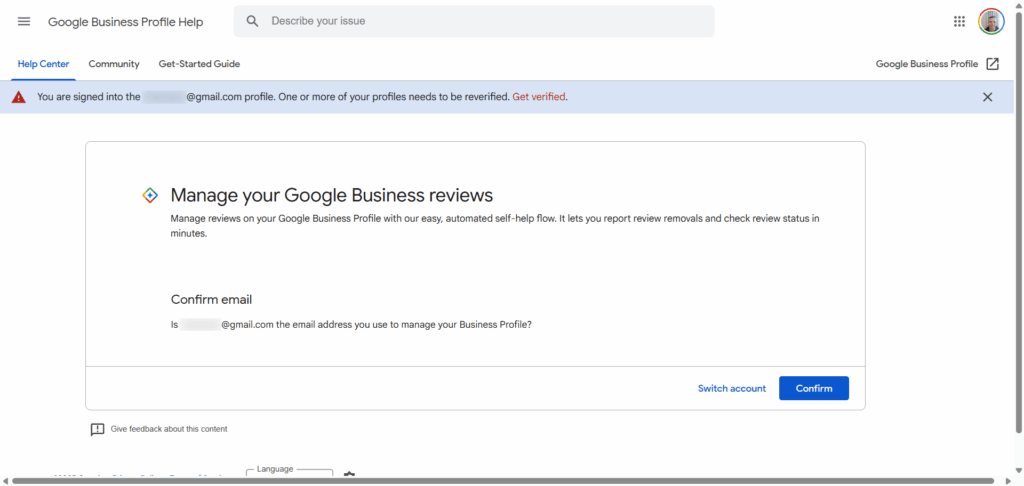
1. Visit the Review Removal Tool
Go to:
👉 https://support.google.com/business/workflow/9945796
.
.
2. Select Your Business
Sign in and choose the business profile where the review was posted.
3. Find the Review
Locate the review in question.
Click “Report Review”.
4. Choose a Reason
Pick the reason that best describes why the review violates Google’s policies.
5. Submit the Request
Google will review your report and, if it violates guidelines, remove the review.
.
.
🙋 For Non-Business Owners: How to Report a Problematic Review on Another Business
If you’re not the business owner but spot a review that’s clearly inappropriate or abusive, you can still report it directly from Google Search or Maps.
Step-by-Step (Google Maps or Search):
1. Find the Business Profile
Search for the business on Google or open it in Google Maps.
2. Scroll to the Review Section
Find the review you believe violates Google’s content policies.
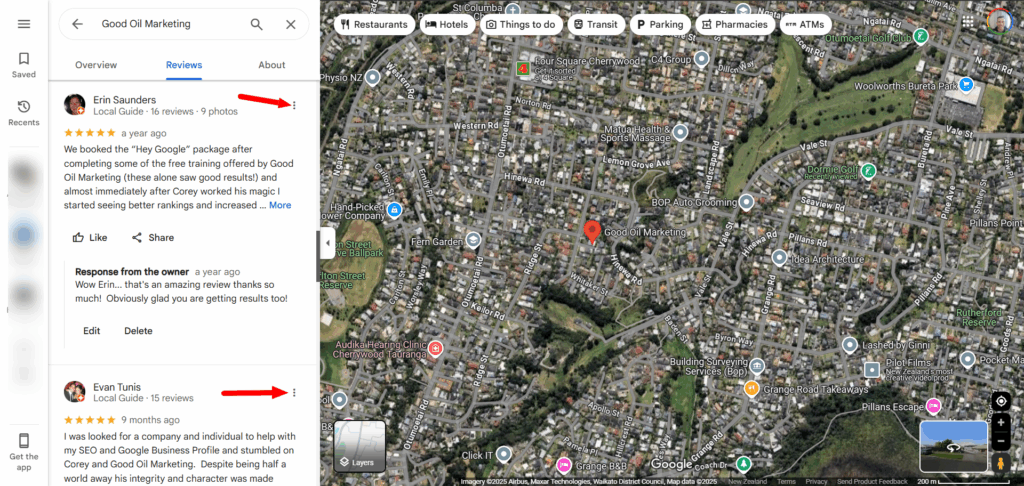
3. Click the Three Dots (⋮) Next to the Review
On desktop or mobile, you’ll see three vertical dots or a small flag icon.
.
4. Select “Report Review” or “Flag as Inappropriate”
You’ll be asked to choose a reason why the review should be reported (e.g. hate speech, spam, conflict of interest, etc.).
5. Submit Your Report
Google will evaluate it and take action if it violates policy.
.
.
Common Violations That Can Lead to Removal
Google will consider removing reviews that involve:
- Fake content or spam
- Harassment or hate speech
- Personal attacks
- Inappropriate content (sexual, violent, offensive)
- Reviews from competitors or ex-employees
.
.
Final Thoughts
Whether you’re a business owner trying to protect your reputation or a customer spotting abuse, Google offers ways to report and potentially remove harmful reviews.
Just remember, the review must clearly violate Google’s policies to qualify for removal.
🛠 Need to report a review now?
Use the official tool:
.
Extra Marketing Resources
► YouTube Channel – free Google, SEO, and Google Business Profile tips
► Substack – free resources and articles to help YOU build a better Google presence for your business
► How to get backlinks in your area for Local SEO
.
.
ee